# Week 8 - Memory management
Last edited: 2025-03-09
# Overview
The operation system supports the abstraction of virtual memory for processes so it need to:
- Map virtual memory onto physical memory .
- Manage what should be in physical memory .
- Validate memory access of processes.
When we speak about memory there are two main abstractions OS can use for memory:
- Paging system : This uses memory pages which fixes the size of the smallest unit that can be moved between memory locations. This is the currently the most popular way to manage memory.
- Memory segmentation : This uses memory segments which have variable sizes.
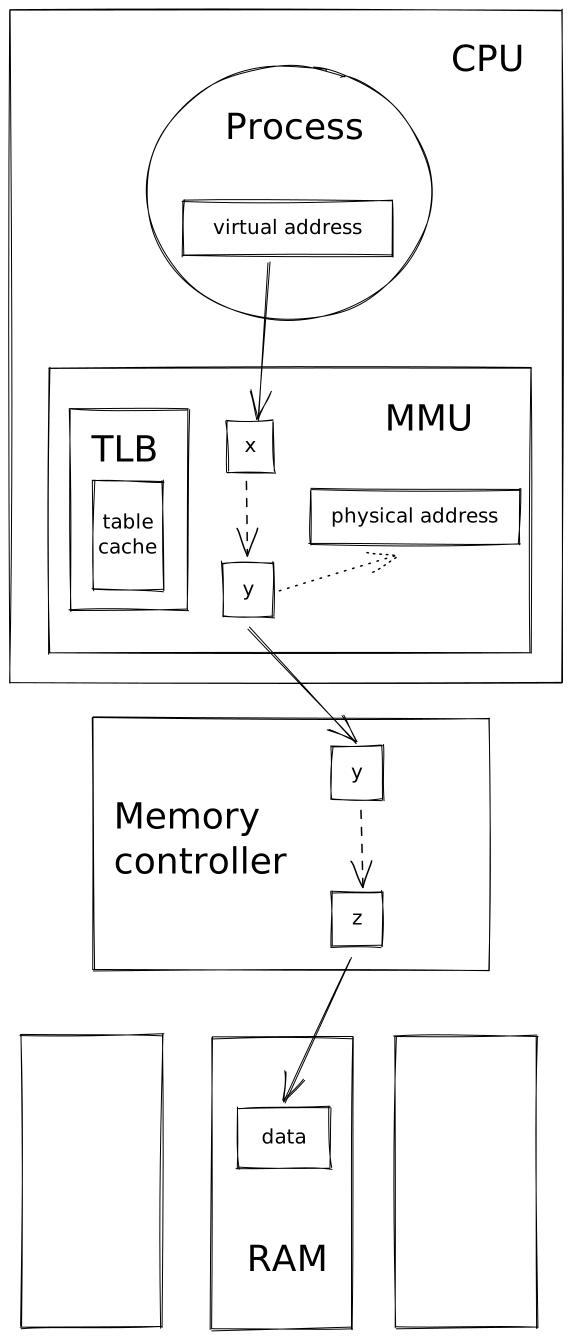
To support these memory mapping there are 3 bits of hardware that take a virtual address to a place on RAM .
- Memory Management Unit (MMU) : A component on the CPU that performs the mapping from virtual memory to physical memory . This is also responsible for raising faults for illegal access or accesses that require different permissions.
- Translation Lookaside Buffer (TLB) : A cache within the MMU to speed up address mappings.
- Memory controller : A component that maps different sticks of RAM into one contiguous physical address space to be used by the MMU .
# Page tables
Note here in paging that the physical address consists of a virtual page number with an offset.
Physical memory is only allocated to virtual memory when it is first referenced. This is identified by the operating system when a physical memories location is not in a page table . When this happens the operating system takes control and either allocates the memory or swaps something out of RAM to provide space for the new memory. This is called ‘allocation on first touch’. When a page is removed from RAM this is called ‘reclaimed’.
The MMU uses the flags within the page table entry to determine if the processes operation on that memory is valid. If not it raises a fault which triggers the kernels page fault handler.
# Page table size
There are two major factors that influence the page table size:
- The register size. I.e. if you are on a 32-bit architecture or a 64-bit architecture.
- The size of the pages . I.e. What size chunks are you cutting your RAM into.
The register size is important as it limits the size of the virtual address . The size of the page is important as it determines how large the offset needs to be.
Page sizes are determined by the operating system but commonly are 4kB, 2MB (large), and 1GB (huge).
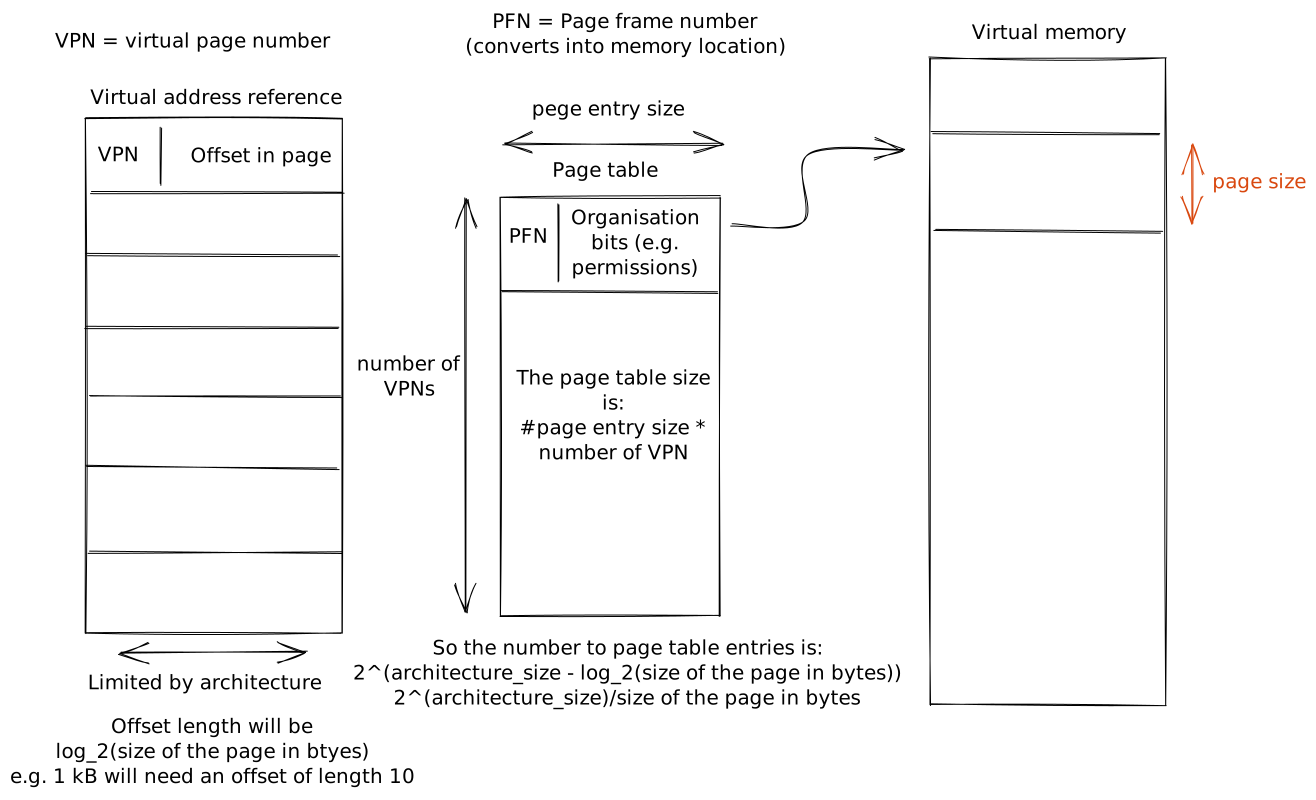
As a byte is the smallest addressable size, lets use this as our unit for the below calculations. As we have a 32-bit architecture the virtual addresses have size 32 bits . As the page size is 4kB = $2^2 * 2^{10} = 2^{12}$B we will need 12 bits for the offset. Therefore we are left with 20 bits of the virtual address for the Virtual page number (VPN) . This means there are $2^{20}$ pages . With this we can now work out the size of the page table. For this architecture, 32-bit addresses are 4 bytes large which is the size of the page table entry . We have $2^{20}$ page entries so we get $4 * 2^{20}$B = 4 MB of size.
If we do the same calculation with a 64-bit architecture we get 64-12 = 62 bits for the number of page table entries. Therefore we get a page table size of $2^{64} * 4$B = 64PB per process! Way too large to hold in memory or disk for most computers!
# Multi-level page tables
Suppose we have the same processes running only a 12-bit architecture. Though we run it on two different machines where:
- the first uses flat page tables, with virtual addresses having a 6 bit VPN and a 6-bit offset, and
- the second uses 2-level page tables, with the virtual addresses having a 2 bit first index and 4 bit second index with a 6-bit offset.
Suppose both of these processes use the first 2kB and last 1kB of memory. How large are the page tables and how many entries do they use?
Notice as they both have 6 bit off sets the page size is $2^6 = 64$B. Therefore the first 2kB = $2^{11}$ B takes the first $2^{11}/2^{6}=2^5 = 32$ entries and the last 1kB takes the last $2^4 = 16$ entries. In the flat table the page table has 64 entries in which 48 are used. In the second example the fist table has 4 entries with only 3 of these being used, the second layer has 16 entries and in all 3 tables all of these are used. You can see in the second example we had in total 52 page table entries with only 1 not used but in the first we had 64 entries with 16 not being used.
# Inverted page tables
# Segmentation
Normally segmentation is used in conjunction with paging . First use segmentation to cut down the virtual memory then using paging to get pages within that segment.
# Page size
What is the correct page size? This depends on your application, normally page sizes come in 3 different buckets ‘regular’ about 4kB, ’large’ about 2MB and ‘huge’ about 1GB.
Larger page sizes means smaller page tables as the offset does more of the work - however this can lead to internal fragmentation . Therefore applications that are likely to need large contiguous blocks of memory such as databases are better off with larger or huge table sizes but applications that to store lots of small objects are better off with smaller page tables.
# Memory allocation
The main challenge memory allocators suffer from is external fragmentation .
The linux kernel has two types of allocators.
However, the objects the linux kernel normally stores are not powers of 2. Causing a lot of internal fragmentation so another memory allocator is also used.
# Demand paging
# When should pages be swapped out?
- When we are nearing full use of the memory.
- When the CPU utilization is low.
# What pages should be swapped out?
- Pages that aren’t going to be used in the future.
- Hard to tell in practice so we use heuristics.
- History-based predictions such as LRU
- Access bit in the page table entry can be used for this.
- Pages that don’t need to be written out.
- Dirty bit in the page table entry can be used for this.
- Avoid swapping non-swappable pages, such as some kernel state. Applications can ‘pin’ their pages to guarantee they stay in memory.