# Week 2 - Processes and Process Management
Last edited: 2024-08-26
# Aside
# Metaphor
A process is line an order of toys:
- State of execution:
- Completed,
- waiting, or
- In progress.
- Parts and temporary holding area
- Pieces used to make the toy, or
- Containers to put the pieces.
- May require special hardware:
- Sewing machine or
- glue gun.
This is analogy to an OS where a process has:
- State of execution:
- Program counter, or
- Stack
- Parts and temporary holding area
- data, or
- registered state in memory.
- May require special hardware:
- I/O, or
- access to sound output.
# Process execution state
For the OS to stop and start running processes it must keep track of what it is doing. For this it uses:
All this information is stored in the PCB :
This block is fully instantiated when a process starts however it is frequently updated as the process is executing. It is the job of the OS to keep this up to date and correct - it will need this when it starts and stops processes .
# Switching process
When running a given process that CPU has the PCB loaded into the CPU registers . If the CPU were to suspend that process it would have to write that PCB to memory and load the new processes PCB into the CPU registers . This is called a Context switch (CPU) .
Context switching is costly for two reasons:
- Direct costs: This comes from physically having to write the PCB from the CPU registers into memory and vice versa.
- Indirect costs: The CPU has multiple layers of caches . When switching from one process to another you have to switch the data present in all these caches normally making data access temporarily very costly.
# Process life cycle
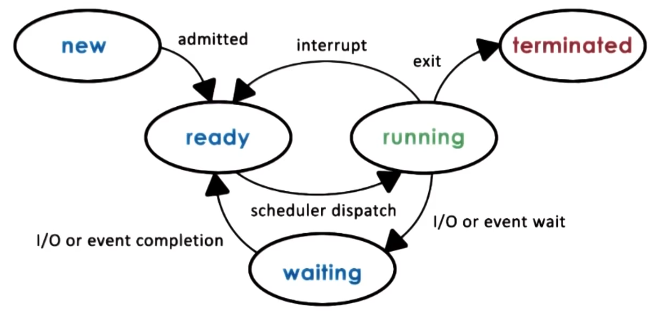
During a processes time it goes through multiple different stages.
- New: Once the user issues a process that they want to start a PCB is made and it is admitted to the CPU .
- Ready: This is a process that has something to do but is not being ran on the CPU yet.
- Waiting: If the process has to wait on some event from the network or I/O then it will be moved into a waiting stating for that to finish.
- Running: It will have been context switched onto and the PCB loaded into the CPU register .
- Terminated: Once a process has exited or error-ed it moves state to terminated to be cleaned up.
# Creation
When you start the computer the OS starts a number of processes that have privileged access. These in tern create the application that you run on your computer. There are two system calls to create a new process :
- Fork: This creates an exact copy of the current process, including the program counter .
- Exec: This replaces a processes PCB with that of a new program. The normal flow for a process to start another one is to call fork followed by exec.
# CPU Scheduler
This is a process that determines which one of the ready processes will be dispatched next to the CPU and how long it should run for. This is done via 3 operations:
- Preempt: Interrupt and save the current context.
- Schedule: Run the scheduler to choose the next process.
- Dispatch: dispatch a process and switch to its context. An efficient OS wants to spend as much time running processes the user wants to run and the least time possible running the above 3 operations.
There are two important decisions that you must take when deciding on the scheduler.
- How long should processes run for?
- What metrics to choose the next process to run?
# I/O scheduling
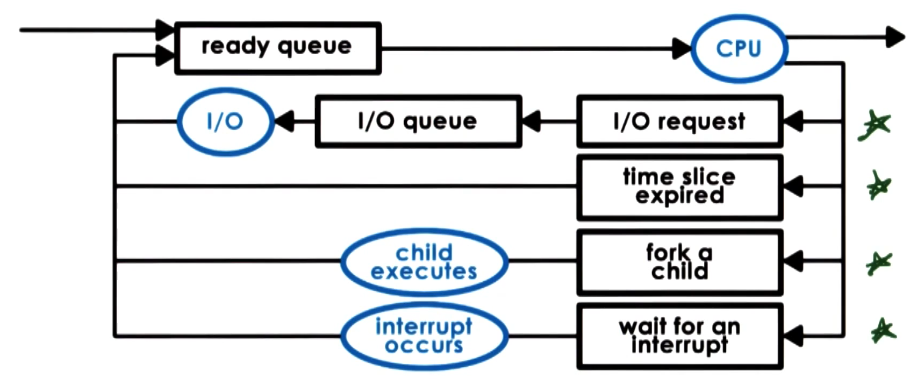
When a process is stopped by an IO operation this is then handled by the device driver associated with that IO task. The process will enter the waiting state until the device driver interrupts the CPU to let it know the operation has been completed and the process can move back to the ready state. Though there are other ways this waiting state can end - for example a time out.
# Inter-process communication
As modern applications get more complex they are being structured to be multiple processes communicating with on another. However, the OS is on purposely structured to isolate different applications from one another. Therefore they need to communicate to each other using IPC