# Week 1 - Introduction to Operating systems
Last edited: 2024-08-26
# Metaphor
The OS is a lot like a toyshop manager. They are required to:
- Direct the operational resources
- Controls use of employees time,
- Distribute tools and parts between workers
- Enforces working policies
- Ensures fairness between workers,
- Make sure toys are made safely,
- How to cleans-up after the job has been completed.
- Mitigates difficulty of complex tasks
- Simplifies operations for each worker to do,
- Chooses optimal task allocation to improve performance.
In comparison an OS does the following:
- Direct the operational resources
- Controls the use of CPU and memory,
- Controls the use of peripheral devices.
- Enforces working policies
- Can ensure fair use of the resources between different processes,
- Limit resources a certain process has access to.
- Mitigates difficulty of complex tasks
- Abstracts hardware (system calls).
# Examples
- Desktop
- Microsoft Windows
- UNIX-based
- Mac OS X (BSD)
- Linux
- Embedded
- Android
- A form of linux
- IOS
- Symbian
- Android
We will focus on Linux in this course.
# OS elements
There are 3 main OS elements:
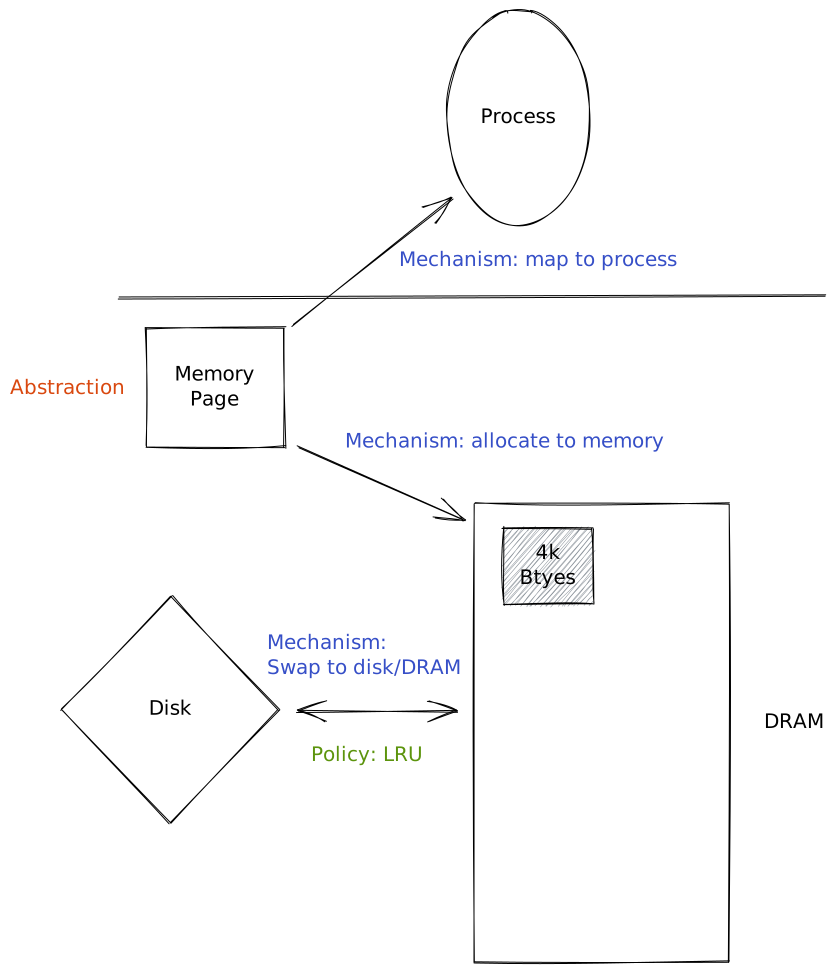
Abstractions:
- process,
- thread,
- file,
- socket, and
- memory page.
Mechanisms:
- create,
- schedule,
- open,
- write, and
- allocate.
Policies:
# Example: Memory management
# Design principles
- Separation of mechanism and policy
- Implement flexible mechanisms that support many policies
- In different settings different policies make more sense.
- Optimise for common case
- Where will the OS be used?
- What will the user want to execute on that machine?
- What are the workload requirements?
# User/Kernel protection
User mode application have to access hardware through system calls. The OS can notify applications through signals.
# System call flow chart
# OS architecture
At first OS included all the features within one monolithic application. This had the following advantages:
- You have everything already, you do not need to go somewhere else, and
- You can use compile time optimizations to improve efficiency. Though had the following downsides:
- Lower customisation, portability and manageability,
- Higher memory footprint to run the OS, and
- Lower performance when you do not need all aspects of the OS.
OS such as LINUX instead have gone for a modular approach, where OS applications have to conform to a standard interface for system calls. The user then can add the modules to the OS that they want to use. This had the following advantages:
- Easier to maintain as it is less code,
- Smaller footprint in memory,
- Less resources used to run the OS , Though comes with the following down sides:
- Indirection can effect performance,
- Maintenance can be an issue as you rely on lots of different code bases that can introduce bugs.
For embedded devices another architecture is common called a Micro-kernel. These typically only handle memory and process management. Though adds a standard Inter process communication call - as services such as file systems or disk drivers are now application level processes rather than handled by the OS. This has the following advantages:
- They are normally a very small code base.
- It is easy to verify behaviour, so you can be sure the OS behaves well. Though they come with a lot of down sides:
- They are not normally portable as they are designed for a specific bit of hardware.
- Software development is more complex as they need to interact with difference processes that normally would be part of the OS .
- There is lots of user/kernel crossing as they need to use the IPC a lot.
# Linux
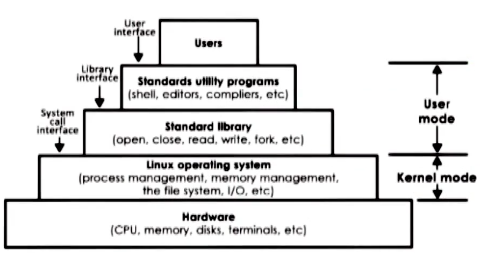
The linux OS is built in a layer architecture to make it simpler to use.
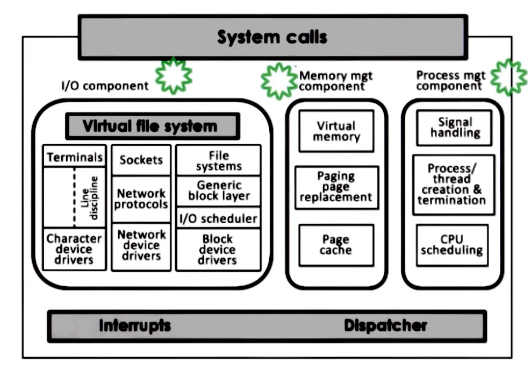
The kernel itself has a couple of components that can all be switched out for specific users needs.
# Mac
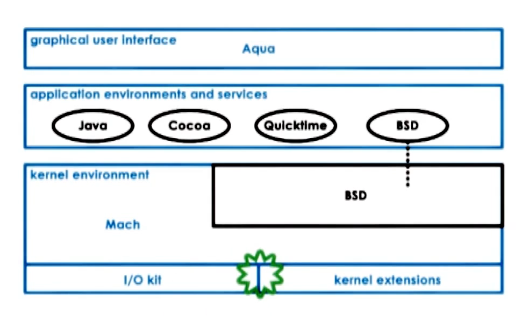
Mac uses a micro-kernel for all low level operations with a BSD component provides a unix interface for the rest of the OS.