# Week 11 - Security
Last edited: 2026-01-28
# Principles of information security
Information security is a large part of the developer industry. This field has whole masters courses dedicated to its study. However, lots of the modern terminology was invented by visionaries in the early years of computer history.
The notes in this section are based on the following paper:
Protection and the Control of Information in Computer Systems
# Terminology
First we make a clear distinction between privacy and security:
Privacy is about controlling who is allowed to access, observe, or use information about you. It concerns people, preferences, context, and expectations. Example: Deciding who may see your photos or email address.
Security is about the technical and organizational measures used to enforce desired privacy (and other protections such as integrity and availability). It covers authentication, encryption, access control, safe storage, etc. Example: The system verifying your password before allowing access to your data.
Privacy is a user-centric concept whereas security is a system-centric concept.
Some concerns related to this are:
Unauthorized information release.
Unauthorized information modification.
Unauthorized denial of use (denial of service).
A goal of a good system should prevent all the above. However, this statement is hard to prove as it is a negative statement such as ’there are no bugs in my code’. Instead we want a positive definition of things we can check.
# Levels of protection
We can broadly group protection into levels.
Unprotected: No protection at all.
All or nothing: You either have access to the whole system or you don’t.
Controlled sharing: You can provide access control lists (ACLs) for files.
User programmed sharing controls: You can differentiate users into different groups and those groups have different access levels for files. For example unix styled creator, group, and other permissions.
Classified compartments: You can put particular requirements on each file based on classification levels. For example, in the civil service, documents will have a classification level indicating the security clearance required to view different information.
These are very general and you should specialise these to fit your use case. We also need to be able to dynamically change these.
# Design principles
There are some guiding principles for protection:
Economy of mechanisms: It should be easy to verify that mechanisms of security are working correctly.
Fail-safe defaults: Deny access by default (explicitly allow access).
Complete mediation: When it comes to security we need to not take short cuts for efficiency such as caching passwords - as this compromises on the security.
Open design: The design should be published so others can review it but you should protect the keys.
Separation of privilege: The system should be designed so no one person has privileged access to everything.
Least privilege: The privileges to do something should be as limited as possible.
Least common mechanism: The mechanism used to implement the control should have the least privileges possible, so if it fails it limits the damage attackers can do.
Psychological acceptability: Users should know clearly what they are doing when they do it. This means a good UI is critical, with warnings clearly stating what changes will mean.
There are two very high level takeaways from all these principles:
Difficult to crack the protection boundary.
Detection rather than prevention: Prevention is incredibly hard, whereas detection is relatively easier.
# Andrew file system
The Andrew file system was built at a university and was for users to connect from any work station on campus. Core to the assumptions of the design is that the network is not to be trusted between the workstations and the servers (which worked only over LAN). However, we assume the servers themselves are in a trusted physical environment.
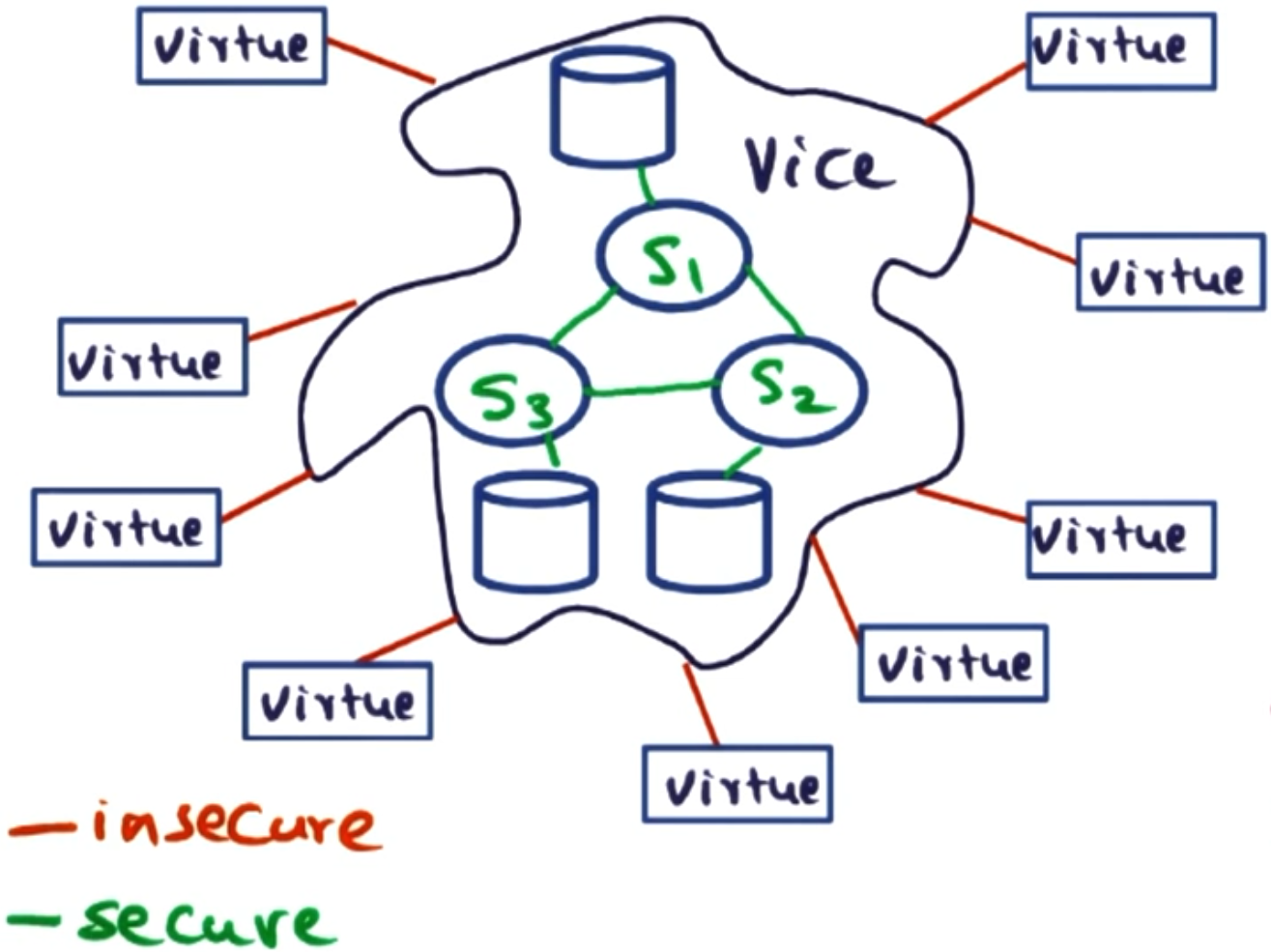
These workstations will run Unix and will have a special subsystem called Venus that will run the authentication for them. It will use RPC to communicate with the file servers. The RPC messages are encrypted as we can not trust the connection between the user and the server.
# Encryption primer
The easiest way to encrypt is with a private key system. If we assume both parties have a shared private key (symmetric key system) then we can send data securely between them in the following fashion:
Sender makes data: data,
Sender encrypts data: Enc(data, key) = cypher_text
Sender sends data to receiver.
Receiver decrypts data: Dec(cypher_text, key) = data
However, this requirement for both parties to have the same private key is a significant problem. There is a second problem: to decrypt the message, you also need to know who is sending it, so you can use the correct private key to decipher their messages (if you have more than one).
So the next step is to use a public key system, where the receiver has a private key they keep to themselves and a public key they share to everyone (asymmetric key system).
Sender makes data: data,
Sender encrypts data: Enc(data, public_key) = cypher_text
Sender sends data to receiver.
Receiver decrypts data: Dec(cypher_text, private_key) = data
In this case, no one can decrypt the data encrypted using the public key without the private key. This can form symmetric channels if both parties have a public-private key pair.
# Challenges for Andrew file system
The setup of the Andrew file system presents some challenges its design will have to overcome:
Authenticate the users: The server will need to be sure who they are talking to is the users they claim to be.
Authenticate the server: The user has the symmetric problem with the server; it does not want to get spoofed.
Prevent replay attacks: Both the server and the user need to stop a man-in-the-middle from replaying their messages to one another to gain access or trust.
Isolated users: The server needs to be able to isolate users from each other.
# Andrew file system structure
The Andrew file system uses private key encryption - whilst this does suffer from the key sharing problem in a smaller campus setting this isn’t ‘so hard’. Each user will have a username and password.
You can not use the password as your private key for all communications. Whilst passwords correctly set are secure, repeated use of them as a private key is a security hole and can allow snoopers to work it out over the long term.
To get around this issue, the login and password is only used to login to the system. After the initial login the rest of the communication uses ephemeral id’s and keys. This means we will get 3 types of communication between the user and the server:
Login: The user sends a login request to the server. In response, an HKC (handshake key client) is provided to the user for future use to limit exposure of the user’s password.
RPC session establishment: The server sets up the session using the HKC for subsequent requests with the ephemeral id and key.
File system access: The usual file system calls, all using the session that was established before.
Here a session is one short lived burst of activity such as getting a file, changing a file and saving it back again. However, periods of inactivity close the session down.
# Login
The server keeps the users passwords within a database. This password is encrypted using a key only the server knows - however it is still recoverable by a bad actor with access to the server.
The user logs in as follows using a 3-way handshake:
The user generates a random number and encrypts it using the password. This is sent to the server with the username in clear text.
The authentication server decrypts the random number, increments it by one, and adds another random number it generates to the user’s number. It then encrypts both random numbers using the password and sends that to the user.
To finish the handshake, the user decrypts the message, verifies its number has been incremented by one, and sends back the authentication server’s number incremented by one, encrypted using the password.
The server verifies the number was correctly incremented by one. The server then generates a handshake key client (HKC) and puts this into a data structure called the clear_token. It uses the SERVER_KEY to encrypt the clear token, making the secret_token.
The server encrypts the clear_token and secret_token using the password and sends it to the user.
The user decrypts the message and extracts the HKC from the clear token.
For the RPC session establishment, we will use the secret_token, the public identity, and the handshake key as the private key. This is secure because only the server can decode the secret token with SERVER_KEY to recover the handshake key and decode the message. Additionally, this means the server does not need to keep track of the tokens it has generated, as it can always use the SERVER_KEY to recover the HKC for this session.
# RPC session establishment (bind operation)
(Note: The below is exactly the same as the login but you replace the password with the HKC. This is by design, this means the password is used the least as the encryption key, the HKC is used the second least and ephemeral session tokens are used the most.)
Once we have logged in, we still need to establish both the client and the server are genuine. In the server case this is proving they have the SERVER_KEY and the in the client case proving they have the HKC. The core mechanism for this if they will both encrypt a random number $X_r$ and $Y_r$ for the client and server respectively. Then check the other party can decrypt it and add 1 to it. After they have done this they will exchange a key to use for this session. This goes as follows:
Client generates $X_r$.
Client uses HKC to encrypt X_r E[$X_r$, HKC] and sends message (secret_token, E[$X_r$, HKC]) to the server.
Server gets HKC using SERVER_KEY from the secret_token.
Server generates $Y_r$.
Server uses HKC to encrypt $X_r + 1$ and $Y_r$ E[($X_r + 1$, $Y_r$), HKC] and sends message E[($X_r + 1$, $Y_r$), HKC] to the client. No need for the identity here as the client initialised the connection.
Client uses HKC to decrypt the message and verifies it starts with $X_r + 1$.
Client uses HKC to encrypt $Y_r + 1$ E[$Y_r + 1$, HKC] and sends it to the server.
Server uses HKC to decrypt the message and verifies it starts with $Y_r + 1$.
Server generates a session key $SK$ and a sequence number num.
The server uses HKC to encrypt E[($SK$, num), HKC] and sends it to the client.
Client uses HKC to decrypt the message and uses $SK$ as the private key for this session and will use num as the starting sequence number for requests.
For similar reasons as not using a password to encrypt messages, we similarly don’t want to over use HKC. Therefore for each session we use a new private key $SK$. We use the session number num to stop replay attacks as each request will need a different sequence number.
# File system access
For all file system calls, the session key is used to encrypt the message, and the client appends the sequence number to the message.
# Security
In this setup different keys get used proportional to their life span.
You password is long lived but you only use it once or twice a day when you log in.
The HKC is only to set up each session within your logged in session, it is medium term but only gets used to set up each session.
The SK is used for every RPC call to do with the file server and so is short lived to only a session.
# Strengths and weaknesses of the Andrew file system
[y] Mutual suspicion: Neither the server nor the client trusts the other, so the back-and-forth verification means no man-in-the-middle can spoof each other.
[n] Protection from the user: Once the user is logged in, the server has no protection from the user; they can do what they want.
[n] Confinement of resource usage: A valid user has unlimited access to the server’s resources, so there is no limit on their resource usage.
[y] Authentication: Assuming the user keeps their password secret, the system authenticates users.
[-] Server integrity: Assuming the servers are physically isolated from hostile attackers, this is met, but this is a fairly unreasonable assumption that the paper makes.